Web scraping for vibe coders: add live web data to your app
Give your builder web access, then let your app read pages through a safe server route.
By Spicrawl teamPublished 7 min read
On this page
Your app needs data from another website. Here's how to add it with Spicrawl, without writing scraping code. This works whether you build in Lovable, Bolt, Replit, v0, Claude or Gemini.
Keep your API key secret. It works like a password. Use the builder's secrets store or a connector's private key field. Never paste it into chat or app code. Require sign-in or limit requests before sharing your app.
What "web scraping" means for your app
Web scraping means reading a page and taking out the content you need. Your app could read a pricing page and show the plans. Spicrawl can return Markdown: plain text with simple marks for headings and lists. Read HTML vs Markdown to compare formats.
Two ways to use it
First, choose who needs to read the page: your builder or your app's users.
MCP lets an AI assistant use outside tools. An API lets your app ask another service for data. A server route is the part of your app that handles requests privately.
| Who needs the page? | What to set up |
|---|---|
| The AI building your app | Spicrawl's MCP connection |
| People using your finished app | A server route calling Spicrawl's API |
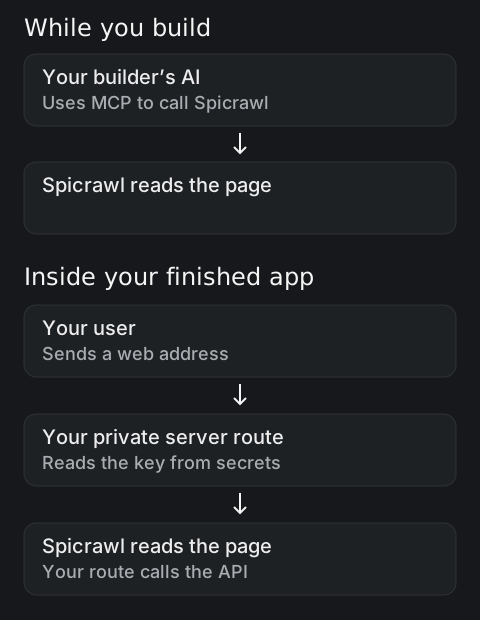
Connecting your builder does not connect your finished app. Lovable and Bolt connectors help while you build. Complete Step 3 to give your users the feature too.
See all integrations and the MCP overview.
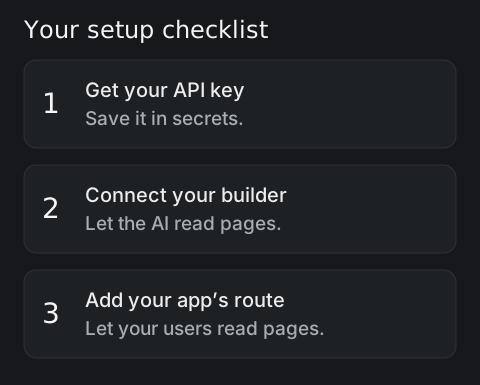
Step 1: Get a free API key
- Create a Spicrawl account.
- Copy your API key from the dashboard.
- Save it in your builder's secrets as
SPICRAWL_API_KEY.
Spicrawl is free during beta. Credits measure how much you use; check pricing for your allowance.
Your builder may call secrets environment variables. These are named settings the app reads when it runs. Never name this key NEXT_PUBLIC_…: that prefix exposes a Next.js setting to visitors.
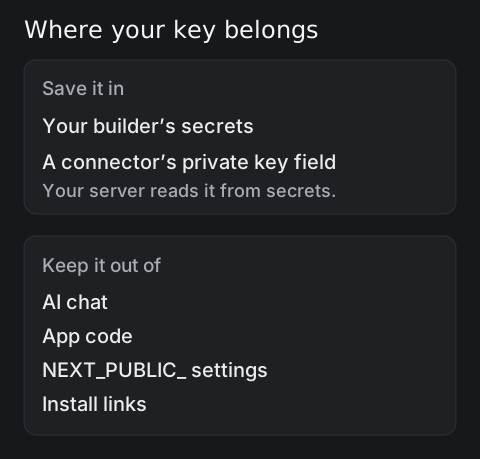
Require sign-in on the route itself. A rate limit caps how many requests someone can send. These checks stop strangers spending your credits.
Step 2: Connect your builder
Use this server address:
https://mcp.spicrawl.com/mcpChoose API key or bearer token, which means sending your key with each request. Turn off OAuth, the alternative account sign-in flow.
Some builders ask for a header: an extra field sent with a request. Use Authorization as its name and Bearer <your Spicrawl API key> as its value. Enter the actual key only in the private credential field.
Each setup ends with the docs' test prompt. Replace example.com/pricing with a real pricing page you may read. It is a placeholder. If the page has no prices, ask the builder to say so.
Lovable
- Open Connectors → + → MCP server.
- Name it
Spicrawland paste the server address. - Choose Direct connection and switch off OAuth.
- Choose bearer token or API key. Enter your key, then Add & authorize.
This connects project chat. Your finished app still needs Step 3 and its own server secret. A 401 means the key was not accepted; try the bearer token option.
Use Spicrawl to read https://example.com/pricing as markdown and list each plan with its monthly price.Bolt
- Open + → Connectors → Manage connectors → Custom MCP server.
- Name it
Spicrawland paste the server address. - Choose HTTP under Transport type, the connection method. Leave SSE unselected.
- Choose API key, enter your key, and look for Connected.
Bolt's API-key header is unconfirmed in the docs. Test a tool call even if it says Connected. If authorization fails, use another builder or Step 3's route. Save a separate server secret for your app.
Use Spicrawl to read https://example.com/pricing as markdown and list each plan with its monthly price.Replit
- Open the Spicrawl install link.
- Add the
Authorizationheader described above in its credential settings. - Authorize the connection in the Project Editor.
- For your app, add
SPICRAWL_API_KEYunder Tools → Secrets → New Secret.
The install link contains no key. Never share a link that includes yours.
Use Spicrawl to read https://example.com/pricing as markdown and list each plan with its monthly price.v0
- Open + → MCPs in the prompt form.
- Add the server address and choose Bearer Token.
- Enter your key in that private field.
- For your app, add
SPICRAWL_API_KEYunder Project menu → Settings → Environment Variables.
Use Spicrawl to read https://example.com/pricing as markdown and list each plan with its monthly price.Step 3: Let your app read web pages
Now add the feature your users will use. Copy this prompt into your builder. It is unchanged from the app-builders docs.
You do not need to write the code. Here is what the terms mean:
- POST sends data. JSON stores it in named fields, such as
url(the web address). process.env.SPICRAWL_API_KEYreads your saved secret on the server.- Client components and the browser bundle are code sent to visitors. Keep secrets out.
max_costcaps credits for one request.X-Target-Statusreports the website's answer.- A status is a result number, such as
200for success.
Add a server route that fetches a URL through Spicrawl and returns it as markdown.
Call POST https://api.spicrawl.com/v1/scrape with the JSON body
{"url": <the URL>, "response_format": "markdown", "max_cost": 1} and the header
Authorization: Bearer followed by process.env.SPICRAWL_API_KEY.
Read the key only on the server from the environment variable SPICRAWL_API_KEY, never
in client components, never in the browser bundle, and never hard-coded.
Return the X-Target-Status response header alongside the markdown.
If Spicrawl responds with an error, pass its JSON error body and status back to the caller.
Only signed-in users may call the route.
Add a form that posts a URL to this route and shows the markdown.
Add SPICRAWL_API_KEY in secrets before running the app. You may paste that name into chat, never the key's value.
Test one page you may read. Check that its text appears and signed-out visitors cannot use the route. See the scrape overview for the request settings.
Keep it safe and cheap
Start with max_cost: 1. This allows a plain fetch: reading a page without running its scripts.
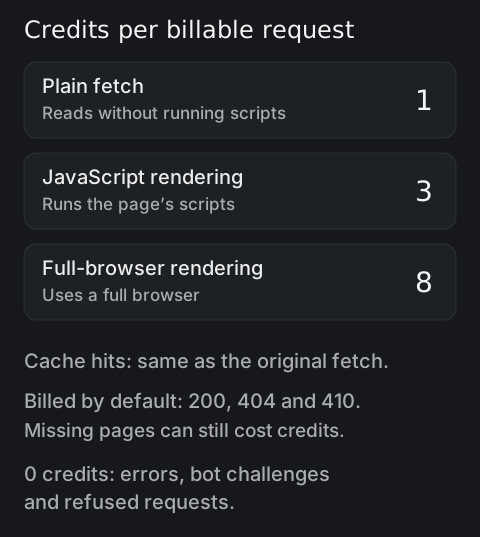
JavaScript rendering runs a page's scripts to load its content. If you need it, use this prompt:
For this URL only, set js_render to true and max_cost to 3 on the Spicrawl API request. Keep the key on the server and keep the sign-in check.A request over your cap is refused before running, at 0 credits. The cap covers one request, so keep a rate limit too. Read the JavaScript guide before changing every request.
Check the website's answer, not just Spicrawl's. Read X-Target-Status:
200: the page answered successfully.404or410: the page is missing. These responses are still billed.403: the site refused access. Do not show it as useful content.
Errors, bot challenges and refused requests cost 0. Other target statuses are unbilled unless you explicitly allow them.
A cache is a saved copy of a page. Cache hits cost the original fetch price. They save time, not credits. For fresh prices or stock, ask your builder to set cache: false. See the credit rules.
Building with Claude or Gemini instead?
These setups connect your coding assistant. Your finished app still needs Step 3.
Claude Code
A command-line tool runs in a terminal: a window for typed commands. With Spicrawl's tool installed and the key supplied securely in the environment, run:
spicrawl init --client claudeFollow the Claude Code setup and full walkthrough for the prerequisites and connection checks.
Gemini CLI
Gemini CLI is Google's coding assistant for the terminal. It removes variables whose names contain KEY before reading MCP headers. Use SPICRAWL_MCP_BEARER instead.
With your key already supplied securely as SPICRAWL_API_KEY, run:
export SPICRAWL_MCP_BEARER="$SPICRAWL_API_KEY"
gemini mcp add --scope user --transport http \
  --header 'Authorization: Bearer $SPICRAWL_MCP_BEARER' \
  spicrawl https://mcp.spicrawl.com/mcp
Keep the single quotes. They save the variable's name, not your key. Start Gemini from that terminal, leave OAuth off, and run /mcp to check. See the Gemini CLI guide.
Google Antigravity
Open the settings file in one of two ways:
- In the Antigravity app: Settings → Customizations → Open MCP Config.
- In the Antigravity editor: in the Agent panel, Additional options → MCP Servers → Manage MCP Servers → View raw config.
The settings use serverUrl, not url. Set it to https://mcp.spicrawl.com/mcp, with an Authorization bearer header.
The documented setup saves the key in plain text. Treat that private settings file as a secret. Keep it out of chat and shared projects. The user-level file is ~/.gemini/config/mcp_config.json; ~ means your home folder. The docs do not show a secret-variable option.
Follow the Antigravity setup, reload the MCP servers, then test a Spicrawl tool call.
When it won't work
- A site blocks access. Ask its owner for permission. Read about Cloudflare blocking AI crawlers.
- A page needs your login. Use an authorized session, which keeps login details between requests. See pages behind a login.
- You want every page on a site. Spicrawl does not crawl, or follow links to find URLs. You supply the URLs yourself.
These features are coming soon, not available:
| Feature | What it means |
|---|---|
| Managed proxies | Spicrawl-provided servers that pass on web requests |
| Stealth | Changes to how automation appears to websites |
| Remote browser | A browser you control elsewhere |
| AI extraction from a prompt | Asking Spicrawl to pull out fields using plain words |
Asking your builder to write code works differently from Spicrawl's future AI extraction feature.
Read the Spicrawl terms and check your permission to use a site's content. This guide is not legal advice.
Frequently asked questions
Do I need to know how to code?
You can ask your builder to write the code using the prompt in this guide. You still need to add your key in secrets, test the result, and check that only signed-in users can use the route.
Is it free?
Spicrawl is free during beta, with 1,000 credits a month and no credit card. Plain requests use 1 credit, JavaScript rendering 3, and full-browser rendering 8. Cache hits use credits too.
Is web scraping legal?
This guide is not legal advice. Check the site's terms and your permission to use its content. Review Spicrawl's Terms of Service, linked above, and seek legal advice if you are unsure.
Why does my app say 401?
A 401 means the request was not accepted with that key. Check that SPICRAWL_API_KEY exists in the app's server secrets and that the key is valid. For an MCP connector, check its credential field. Never paste the key into chat to debug it.
Can my app scrape any website?
No. A site can refuse access, require a login, or need JavaScript rendering. Use pages you are allowed to access. Spicrawl reads the URLs you give it; it does not crawl a site or find URLs for you.
Sources
Product details were checked against each company’s own website and docs. Products change: if something here is out of date, email support@spicrawl.com.